
Disclosure: Zarvo TV sells its own IPTV service, and Zarvo TV and Marinios IPTV share common ownership. Everything below comes from Marinios IPTV’s own website, read on October 11, 2026; no streaming tests were run.
This Marinios IPTV review finds clear plan and catalog details. Its one-connection plans may not suit a household watching on several screens.
Check device fit, refund terms, and the different VOD counts before choosing. Compare those details with Zarvo TV’s listed plans and devices for your home.
Marinios IPTV at a glance
Marinios IPTV presents itself as an IPTV service for viewers across several regions. Its site names the USA, UK, Canada, Europe, Asia, and MENA, with regional options including France, Turkey, Greece, Belgium, the Netherlands, Arabic, Latin America, India, and Germany.
These regions show the audience named on the site, not guaranteed access in every location. For a household choosing a service for the living-room TV and personal screens, check that your location is covered before deciding.
Quick tip: If your household is outside the named regions, check the site’s current regional information before choosing.
What’s included with Marinios IPTV
The website claims 25,000+ live channels and 100,000+ movies and TV series. Its homepage banner instead says 150k+ VOD.
Listed quality labels are 4K, HD, Full HD, FHD, and 4K Ultra HD. Listed devices include Smart TVs, Android boxes and devices, Firestick, MAG devices, iOS, and PC. IPTV Smarters is the listed app, so check your device’s available app options before buying.
The website describes its EPG as updated and user-friendly; catch-up is not listed. It also attributes Global CDN, an anti-freeze system, load balancing, Predictive Content Prefetch, Server Stability 99%, and daily VOD refresh to its service.
How much does Marinios IPTV cost? Plans and prices
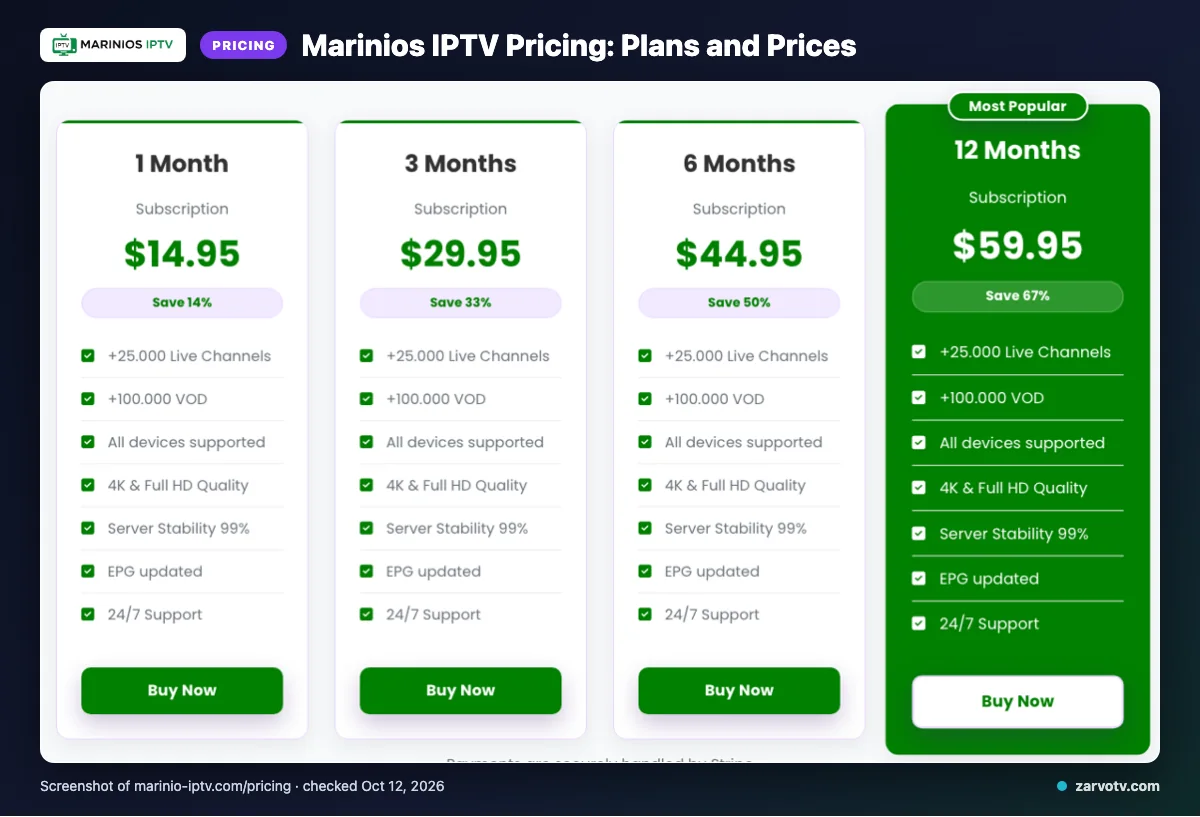
Marinios IPTV lists four subscription terms, from one month to twelve months, and each includes one connection. The listed prices are shown below; the website does not state a currency code for the dollar sign.
| Plan | Duration | Listed price | Connections |
|---|---|---|---|
| 1 Month Subscription | 1 Month | $14.95 | 1 connection |
| 3 Months Subscription | 3 Months | $29.95 | 1 connection |
| 6 Months Subscription | 6 Months | $44.95 | 1 connection |
| 12 Months Subscription | 12 Months | $59.95 | 1 connection |
Prices checked on 2026-10-11. Treat the currency as unspecified when comparing these amounts with household budgets or other services.
Quick tip: Compare the six-month and annual rows directly: the annual option lists a longer duration and a higher price, with the same one-connection count.
Marinios IPTV trial, refund policy and payment options
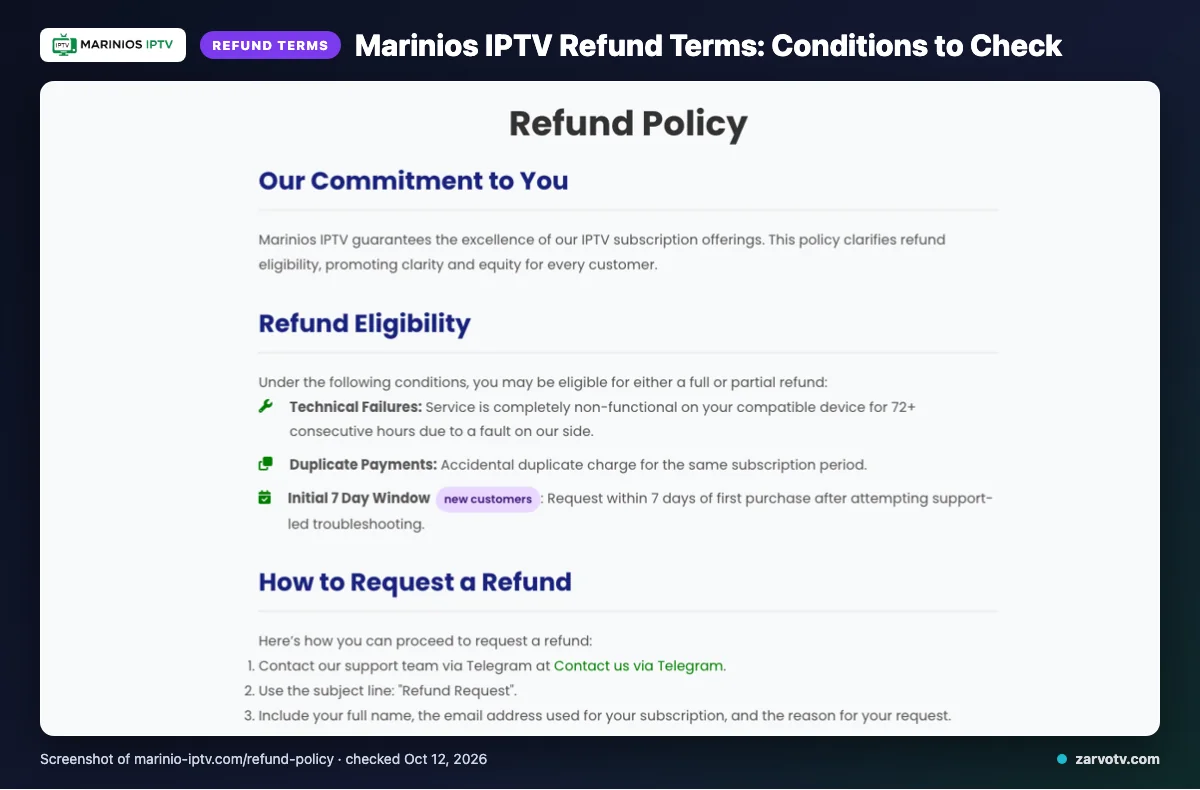
We did not find a free trial on the pages checked. A full or partial refund may be eligible for technical failures lasting 72+ consecutive hours due to its fault, duplicate payments, or a first-purchase request within 7 days after support-led troubleshooting.
Refunds are excluded for content dissatisfaction, slow or unstable internet, Terms of Service violations, and external geo-blocking. Renewal refunds are evaluated individually.
Payment methods listed are Visa, MasterCard, American Express, and PayPal. Subscriptions renew automatically, and you can modify or cancel auto-renewal in the account dashboard.
Read the refund conditions before checkout, especially the support-led troubleshooting requirement.
The pros and cons of Marinios IPTV
Marinios has published details to compare, but one connection may not suit a household watching on several screens. Use the earlier feature, price, and terms sections to check the claims and conditions.
Pros
- The feature section summarizes its published catalog and quality claims.
- It also covers the named EPG and IPTV Smarters, payment options, and regional details.
Cons
- Each listed plan has one connection, which may not suit simultaneous viewing on a living-room TV and a kids’ tablet.
- The trial and catch-up information gaps noted earlier are details to clarify, not proof those options are unavailable.
Quick tip: For a shared home, decide whether one connection fits your viewing routine before comparing catalog claims.
Is Marinios IPTV safe and legal to use?
IPTV legality depends on content licensing and the law where you live. The pages checked for this review do not establish licensing for every program or region, so they cannot confirm that point for you.
Check the rules that apply where you live and the licensing information available for the content you plan to watch. Before signing up, review the service’s terms and handle payment details carefully. Use a payment method you trust, check what information it requires, and keep a record of the terms shown at checkout. The pages reviewed do not establish the service’s security practices, so treat that information as unconfirmed.
Getting started: how to sign up for Marinios IPTV and set it up
Start by checking the current sign-up instructions and terms on Marinios IPTV’s website. Then set up one screen first, so you can confirm the service details work before preparing other household devices.
-
Review the sign-up details. Check the selected option, checkout total, renewal terms, and setup instructions before submitting payment. The exact labels and steps may change, so follow the current website instructions.
-
Complete checkout. Enter the requested details carefully and keep a copy of the confirmation. Use the provider’s own site for payment and account information.
-
Find your activation instructions. After checkout, follow the instructions provided for your account. Keep any login details private and enter them only in the player you choose.
-
Prepare one device. Use a device and player covered in the earlier compatibility section. Install the player from its official app source, then enter your account details as directed.
-
Check the setup. Open the service and confirm that the guide and playback load. If something is missing, check your login details and the provider’s setup guidance before contacting support.
-
Set up other screens carefully. Repeat the process for another household device only after reviewing the account terms for adding screens. This helps you avoid assumptions about how your subscription can be used.
For help with general device setup, see our IPTV installation guide. If you’d like to try a household option with a free trial, we invite you to explore Zarvo TV’s free trial.
Zarvo TV vs Marinios IPTV: side by side
For a home with several screens, compare the plan terms, trial and refund details, and named device fit. Zarvo TV lists options for up to 24 months, while Marinios IPTV’s plan and policy details are summarized above.
| What to compare | Zarvo TV | Marinios IPTV |
|---|---|---|
| Plans | 1 month: $14.95; 3 months: $29.95; 6 months: $39.95; 12 months: $59.95; 24 months: $99.95. | See the plan table above; each listed plan is for one connection. |
| Trial | 24-hour free trial. | See the trial details above. |
| Refund | 7-day refund period. | See the eligibility summary above. |
| Named devices | Fire TV, Android TV and Google TV, Samsung and LG Smart TVs, iPhone, iPad, Apple TV, Android phones, Windows, Mac, and MAG box. | Smart TVs, Android boxes, Android devices, Firestick, MAG devices and MAG Box, iOS, and PC. IPTV Smarters is listed as an app. |
For a bedroom TV, kids’ tablet, and phone, check the listed device fit and connection terms before choosing. If Zarvo TV’s terms suit your household, we invite you to try the free trial.
Is Marinios IPTV right for you? Who should pick it and who should look elsewhere
Marinios IPTV may fit your household if its listed devices and terms match your screens and viewing routine. Look elsewhere if you need certainty about simultaneous viewing or details the published pages leave unclear.
Start with how your home watches. If one person usually uses the living-room TV, your needs may differ from a household where people switch between a bedroom TV, a kids’ tablet, and phones. A device list alone does not tell you how many people can watch at once or how account access works.
Use the connection terms already covered as a key decision point. Check that they suit your household before choosing, especially if different people often watch at the same time. The listed device and app details can help you check whether your preferred setup is a match.
Choose Marinios IPTV when the published information answers your practical questions and its terms work for you. Look elsewhere if you need clearer confirmation before paying, or if you want to compare another service’s household setup. A feature list cannot confirm how playback will perform on your own screens.
Before deciding, write down which screens you expect to use, who may watch at once, and what support you would need if setup gets stuck. Then compare those needs with the details already covered, rather than choosing on catalog claims alone.
If you want to compare with Zarvo TV, we invite you to try our 24-hour free trial on a screen at home.
Frequently Asked Questions
What should you check before choosing?
Check whether one connection fits your household, then confirm the current terms on Marinios IPTV’s site. Its VOD counts differ between pages, and we did not find a free trial on the pages checked.
We invite you to start the free 24-hour trial.