
Disclosure: Zarvo TV sells its own IPTV service, and Zarvo TV and YourFlix IPTV share common ownership. Everything below comes from YourFlix IPTV’s own website, read on October 10, 2026; no streaming tests were run.
This yourflix iptv review finds that YourFlix IPTV lists four plans, each with one active connection per account. It may fit your household if that allowance suits how many screens play at once.
The site describes its content, devices, payment options, and refund terms, but no streaming test was conducted. Compare those details with Zarvo TV and check the account terms before paying.
YourFlix IPTV at a glance
YourFlix IPTV is an IPTV subscription service whose website describes its offer and terms. This yourflix iptv review is for you if you are comparing services and want to see whether the provider’s stated scope suits your household.
The site lists the USA, UK, Canada, Europe, Asia, and MENA among its service regions. It also mentions regional plans for the USA, Canada, Europe, and MENA.
You can read the provider’s details on the official YourFlix IPTV website. The regional list can help you decide whether to investigate further, but it does not confirm that every program or local access condition will suit you.
This overview is based on website information; no streaming test was done. As you compare options for your home, check the provider’s published terms and consider whether they fit the way your household plans to watch.
What’s included with YourFlix IPTV
YourFlix IPTV lists live TV, VOD, several picture-quality options, and support for a range of device types. The details below reflect website claims; no streaming test was conducted.
What content and picture quality does it list?
The site promotes live channels and on-demand titles; the claimed totals are covered in the at-a-glance section. It lists HD, Full HD, and 4K quality options, but actual playback can depend on your device and internet connection.
Which devices and app does it name?
YourFlix IPTV names Smart TVs, Android and iOS devices, Firestick, Android boxes, MAG devices, and PC. IPTV Smarters is the app listed on its site.
That device list may suit a living-room TV, a kids’ tablet, and a phone for viewing away from home. The standard subscription allows one active connection per account, so check the connection terms before planning simultaneous viewing on several screens.
Does YourFlix IPTV include an EPG or catch-up?
The site describes an updated, user-friendly Electronic Program Guide (EPG) for channel navigation. Catch-up viewing is not mentioned on the pages checked.
How much does YourFlix IPTV cost? Plans and prices
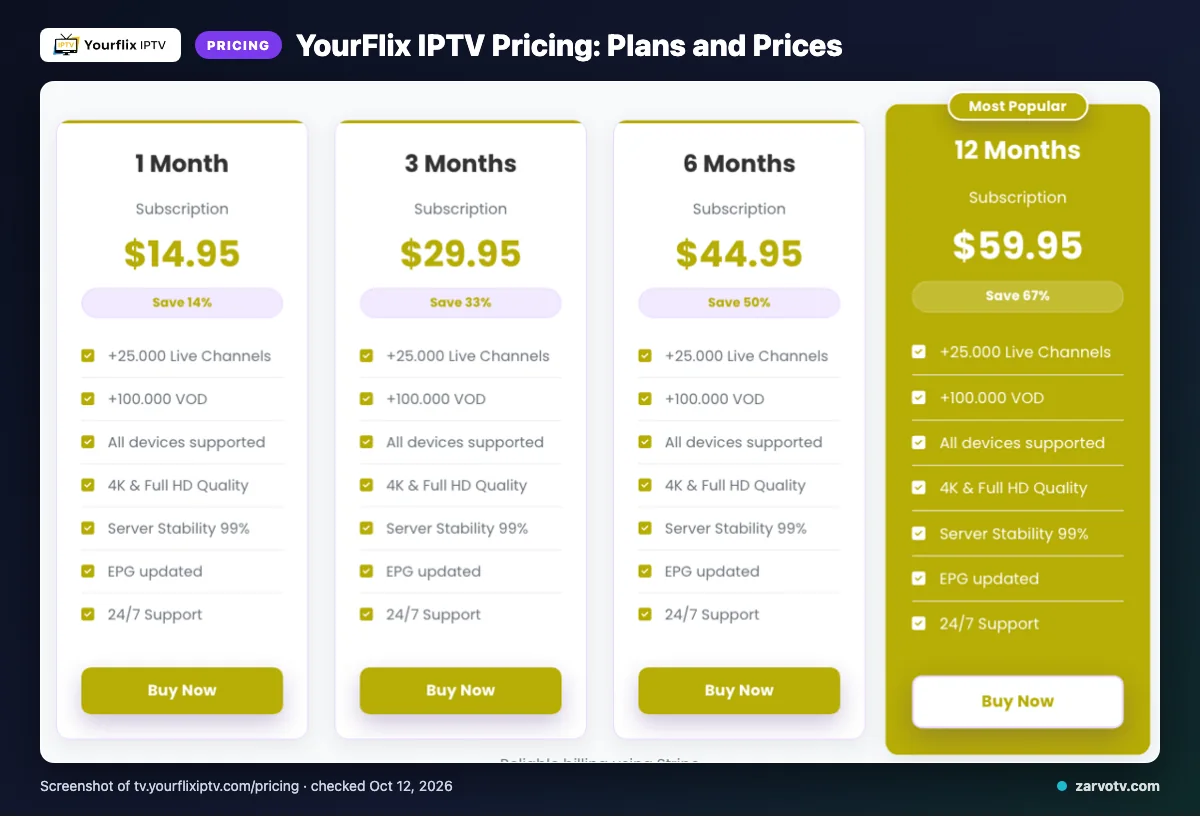
YourFlix IPTV lists four subscription terms, with prices from $14.95 to $59.95. Each listed plan allows one active connection per account; prices were checked on October 10, 2026.
| Plan | Duration | Listed price | Connections |
|---|---|---|---|
| 1 Month Subscription | 1 Month | $14.95 | 1 active connection per account |
| 3 Months Subscription | 3 Months | $29.95 | 1 active connection per account |
| 6 Months Subscription | 6 Months | $44.95 | 1 active connection per account |
| 12 Months Subscription | 12 Months | $59.95 | 1 active connection per account |
The site displays prices with a dollar sign but does not specify the currency.
YourFlix IPTV trial, refund policy and payment options
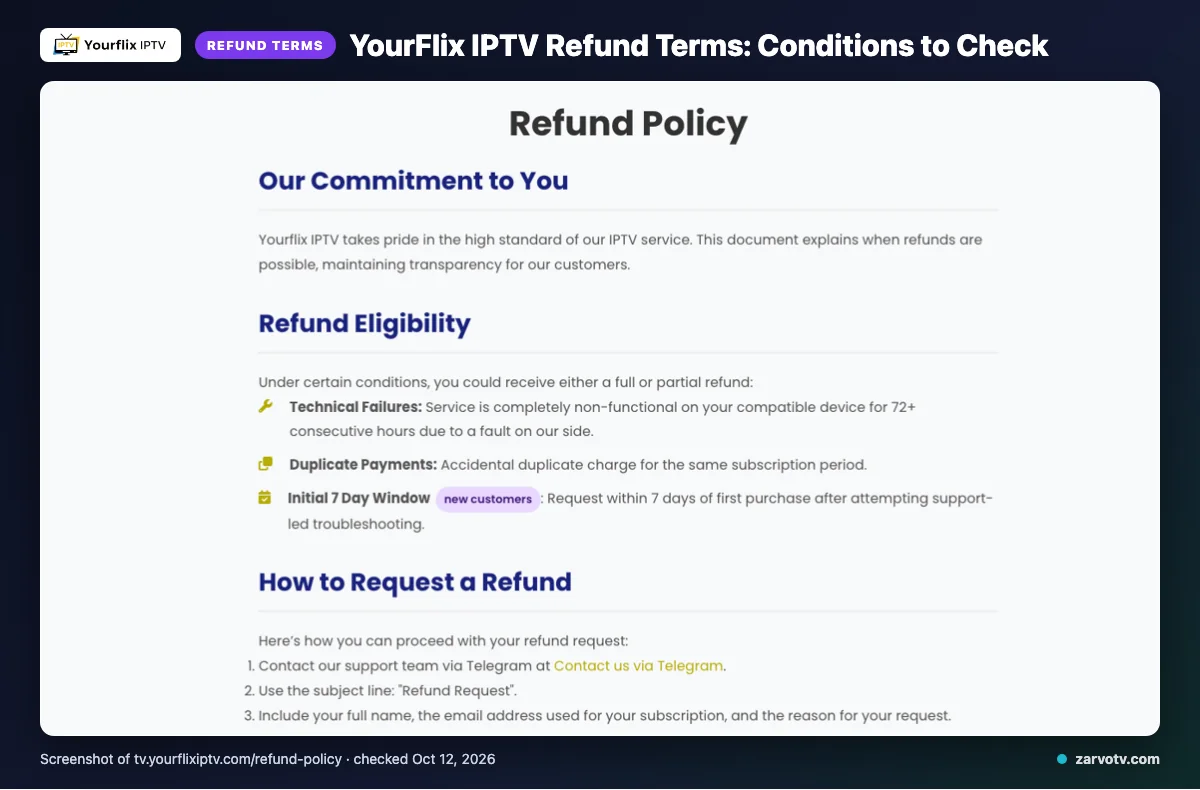
We did not find a free trial on the pages we checked; refunds may apply in listed cases. Payment methods are Visa, MasterCard, American Express, PayPal and Stripe.
Refunds may cover a compatible-device failure that leaves service completely non-functional for 72+ consecutive hours due to its fault, duplicate payments, or first-purchase requests within 7 days after support-led troubleshooting.
Exclusions include dissatisfaction with channels or content, slow or unstable internet, Terms of Service violations, and geo-blocking beyond its control. Renewals are handled case by case.
Send requests via Telegram. Case review takes 0–3 business days; approved refunds are initiated the same day, and funds may take 5–10 business days to appear.
Keep support messages and payment records together if you need to make a refund request.
The pros and cons of YourFlix IPTV
YourFlix IPTV lists useful service features, but some details need checking before you subscribe. These points reflect the website, not a streaming test.
What are the pros?
- The site describes an electronic program guide to help you browse its listings.
- It lists email, live chat, and Telegram as support channels, giving you several ways to ask for help.
- It names features such as a global CDN, predictive content prefetch, and instant channel switching. These are listed capabilities, not independently verified results.
What are the cons?
- Automatic subscription renewal is listed. Check the renewal and cancellation details before you pay.
- The site uses technical feature descriptions without explaining what each one means for everyday viewing.
- The website does not establish how those listed features perform in your home. Your internet connection and setup may affect playback.
Quick tip: Before choosing a service, check the renewal terms and ask support any questions that could affect your household. For a comparison point, you can review Zarvo TV plan details.
Is YourFlix IPTV safe and legal to use?
Legality depends on whether a service has the rights to distribute its content where you watch. The pages checked do not establish YourFlix IPTV’s licensing rights, so you cannot treat its website claims as proof of authorization.
That gap does not prove the service lacks rights. Before subscribing, check the rules that apply in your country and ask the provider how it licenses content for your region.
How can you check the service?
Use the official YourFlix IPTV site to review its current terms and contact details. Look for clear information about the business operating the service, content rights, cancellation, and how it handles your personal information.
Be cautious if answers are vague or you feel pressured to pay before reviewing the terms. A website, payment page, or app listing by itself does not confirm that content is licensed.
How can you protect your household?
Use a unique password and avoid sharing account details outside your household. Keep your streaming device and its software updated, and do not install files from unfamiliar links.
Check that any content you access is permitted in your location. Do not rely on a VPN to make restricted content lawful; local rules and licensing still matter.
This is a website-based review, not a legal opinion or a security audit. If you are unsure about the rules where you live, check local guidance before proceeding.
Getting started: how to sign up for YourFlix IPTV and set it up
Start at the official YourFlix IPTV site and review the plan terms before subscribing. Check the listed connection allowance and payment options, then follow the service’s instructions to set up a screen.
- Choose a plan after checking its connection allowance and available payment options.
- On a device type listed on the site, use IPTV Smarters. Follow the service’s instructions to enter your account details and open the guide.
- Before setting up another screen, check the account’s connection terms and repeat the setup process.
Quick tip: Set up the main living-room screen first, then check account terms before adding a family tablet or bedroom TV.
Zarvo TV vs YourFlix IPTV: side by side
Compare Zarvo TV’s listed options with the YourFlix IPTV details covered earlier. For YourFlix plans, trial, refund terms, and devices, see the relevant sections above.
| What to compare | Zarvo TV | YourFlix IPTV |
|---|---|---|
| Plans | One month: $14.95; 3 months: $29.95; 6 months: $39.95; 12 months: $59.95; 24 months: $99.95. | See the plans and prices section above. |
| Trial | 24-hour free trial. | See the trial section above. |
| Refund | 7-day refund period. | See the refund section above. |
| Devices | Fire TV, Android and Google TV, Samsung and LG TVs, Apple devices, phones, computers, and MAG boxes. | See the devices and app section above. |
For a household using a living-room TV, a bedroom screen, and phones, compare the device details with the plan terms before choosing. That helps you check whether each service fits how your household watches.
If you want to try Zarvo TV before choosing, we invite you to start its 24-hour free trial.
Is YourFlix IPTV right for you? Who should pick it and who should look elsewhere
YourFlix IPTV may suit you if its listed terms match how your household watches. Look elsewhere if you need a different account arrangement for several screens playing at once, or want clearer answers before paying.
Picture your usual routine: a show on the living-room TV, a kids’ tablet in another room, and a phone on the go. Compare that routine with the connection terms already covered; don’t assume one subscription automatically lets every screen play together. If the terms leave a gap, keep looking for a plan that explains how your household can watch.
It may be a reasonable choice if you’re comfortable with the service’s stated conditions and have checked anything important with support. If a renewal, refund, or payment detail affects your decision, make sure you understand it before subscribing. A clear answer can help you avoid choosing a plan that doesn’t fit your home.
In plain terms, choose YourFlix only if its account terms suit your household and you’re comfortable proceeding with the information available. If you need more certainty about how several people can watch at once, compare other options first.
If you’d like to compare another option before deciding, we invite you to try Zarvo TV’s 24-hour free trial.
Frequently Asked Questions
Check the connection terms before subscribing
YourFlix IPTV lists four plan durations, with one active connection per account on each standard plan. If several people may watch at once, check the terms for additional connections before choosing a plan.
Compare the stated plan details and refund conditions with your household’s needs before you subscribe.
We invite you to start the free 24-hour trial.