
Disclosure: This review is published by Zarvo TV, which sells its own IPTV service. Zarvo TV and TalktomyTV IPTV share common ownership. It is based on TalktomyTV IPTV’s website pages checked on October 12, 2026 and does not include streaming tests.
This talktomytv iptv review finds a service listing 25,000+ live channels, with standard plans limited to one device at a time. That limit may not suit a home moving between the living-room TV, a kids’ tablet, and a phone.
TalktomyTV lists four plan durations, but its trial details are unclear on the pages checked. Compare its device terms and refund rules with Zarvo TV before choosing.
What is TalktomyTV IPTV?
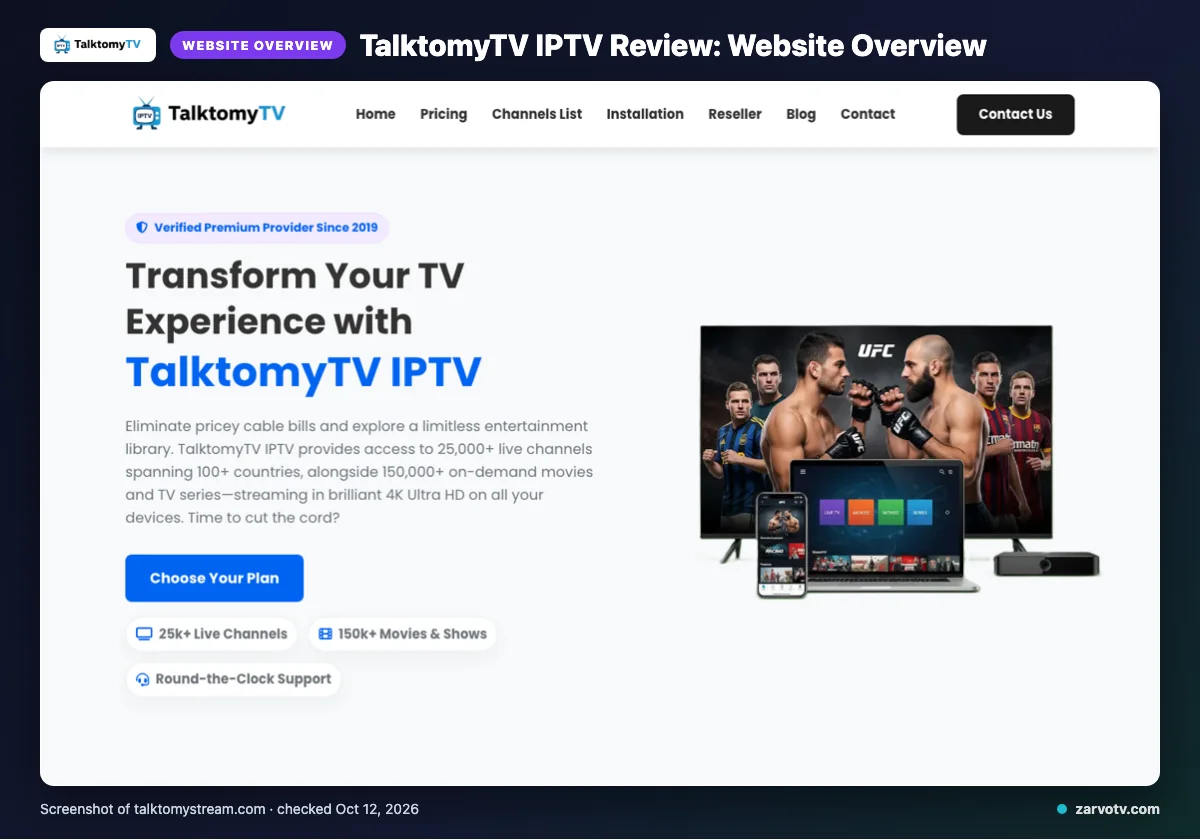
TalktomyTV IPTV is a subscription service that says it offers live channels and video on demand (VOD). Its pages do not name a specific audience, but its stated international selections may interest viewers seeking programming from multiple regions.
The service lists North America, Europe, the Middle East, Asia, Africa and Latin America, alongside country and language selections such as France, the United Kingdom, Turkey, Greece, Belgium, the Netherlands, Arabic, Latin America, the USA, India, Canada and Germany. Check the official TalktomyTV IPTV site for the selections shown.
This is a website-based review; we did not test streaming. Quick tip: Before subscribing, check whether the countries or languages you watch are among the site’s named selections.
What does TalktomyTV IPTV offer?
TalktomyTV lists 25,000+ live channels and content from 100+ countries, but availability can vary by location. Its VOD library is described as refreshed daily with new and classic titles; an exact VOD count is not listed.
Listed picture formats include 4K Ultra HD, 4K, Full HD, FHD, HD, 1080p, and standard definition. Devices shown include Fire TV Stick, smart TVs, Apple devices, and Android devices; named apps include TiviMate, IPTV Smarters Pro, VLC, and GSE IPTV.
Plans include a Live EPG TV Guide; catch-up is not listed on the website. Server and anti-freeze features are advertised but were not independently tested, so match a listed player app to your screen before checkout.
TalktomyTV IPTV plans and prices
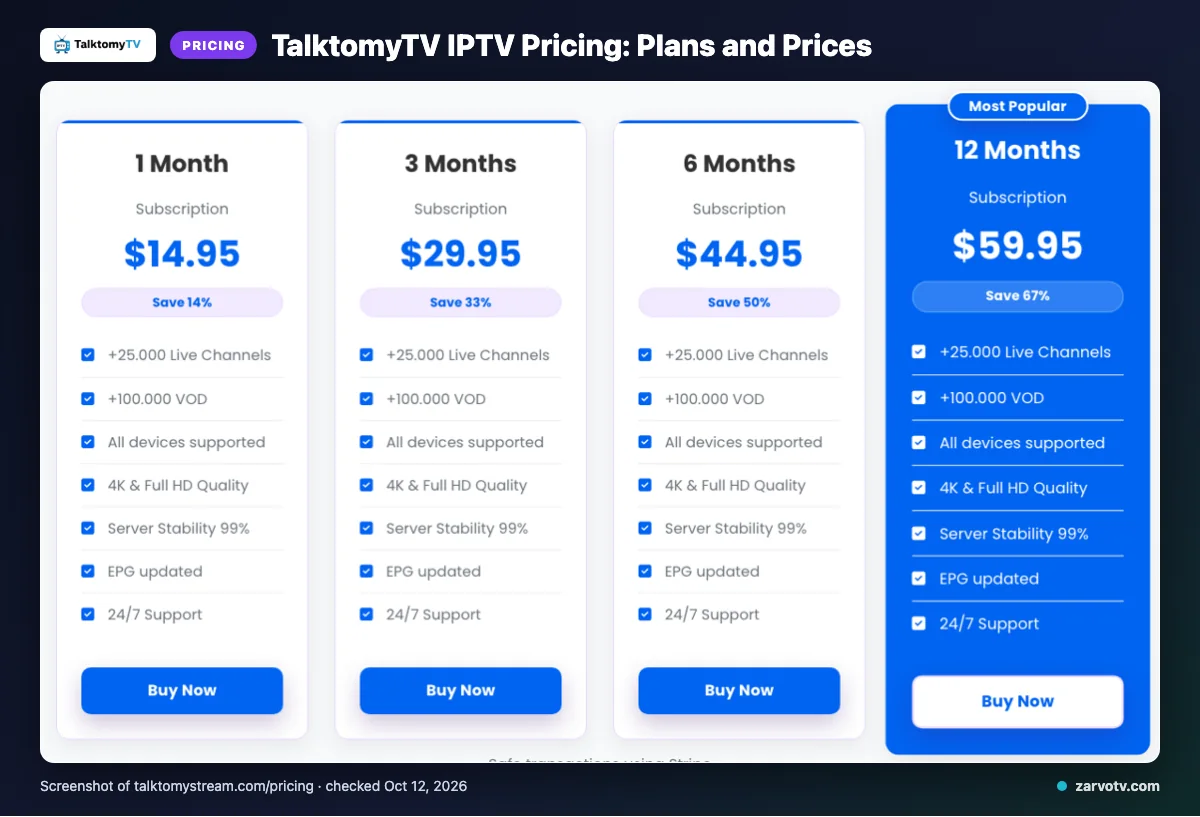
TalktomyTV lists four plan durations, each with one device allowed simultaneously. Compare the duration with how long you expect to use the service, not just the upfront price.
Website checked: 2026-10-12
| Package | Duration | Price in USD | Simultaneous devices |
|---|---|---|---|
| Starter Package | 1 Month | $14.95 | 1 device simultaneously |
| Annual Package | 12 Months | $59.95 | 1 device simultaneously |
| Half-Year Package | 6 Months | $44.95 | 1 device simultaneously |
| Quarterly Package | 3 Months | $29.95 | 1 device simultaneously |
The site also describes a second connection for $10/year and bundles for 3–5 connections. Standard plans list one simultaneous device, so check the connection terms if you want to watch on a living-room TV and a tablet at once.
Quick tip: Match the plan length to your expected use before choosing based on the listed total.
Free trial, refunds and payment at TalktomyTV IPTV
The pages checked state no free-trial offer or trial hours. One customer testimonial mentions a “1-month trial,” creating an inconsistency.
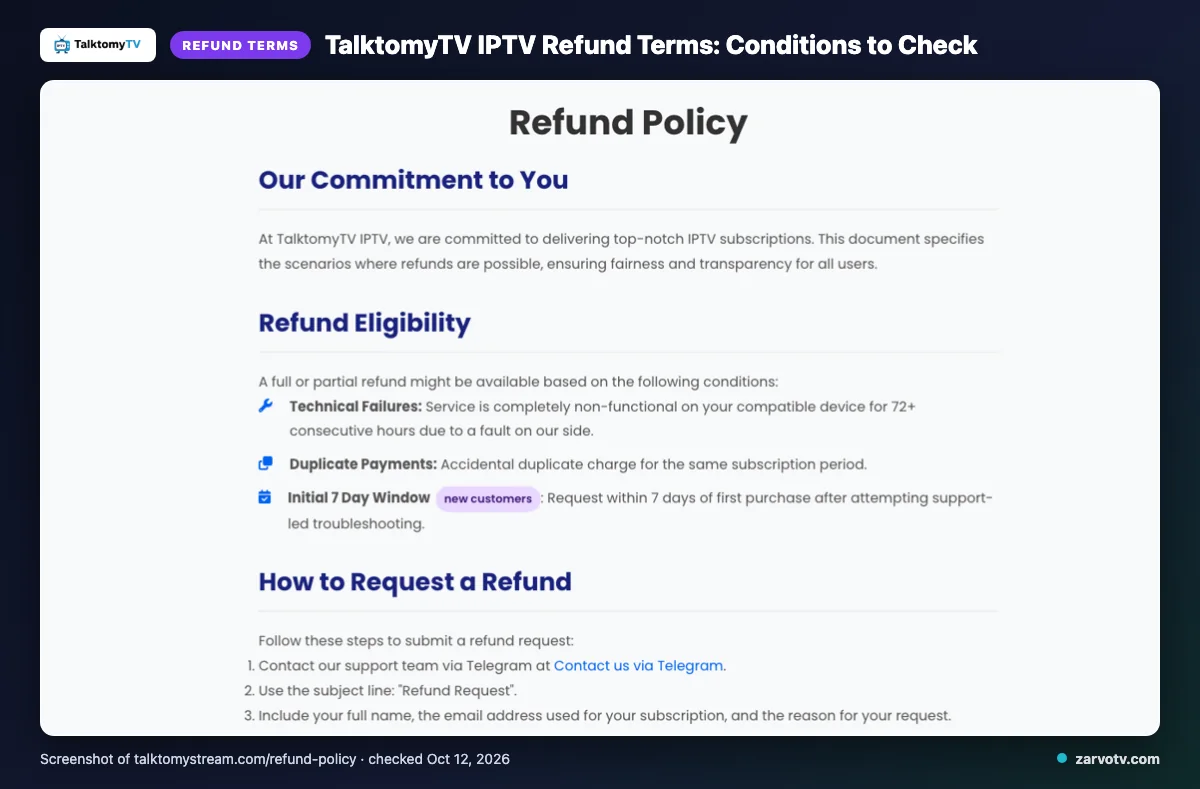
A full or partial refund might be available for a service fault causing complete failure on a compatible device for 72+ consecutive hours, duplicate payments, or a new customer’s request within 7 days after support-led troubleshooting. Refunds are excluded for dissatisfaction with channels or content, slow or unstable internet, Terms of Service violations, and geo-blocking beyond its control. Renewal refunds are case-specific; change-of-mind refunds are usually unavailable after the first 7 days.
Payment methods listed are Visa, MasterCard, American Express, PayPal, cryptocurrency and Stripe. Keep your purchase date and support correspondence available if you request a refund.
TalktomyTV IPTV pros and cons
TalktomyTV’s listed pros are practical subscription and setup details; its cons are gaps in published information. When comparing screens for your household, separate stated features from details the site does not list.
Pros
- Several subscription terms are shown, so you can compare durations before choosing.
- Named devices and apps give you setup options for a living-room TV, bedroom screen, or phone.
- EPG and payment information are provided; see the earlier offer section for those details.
Cons
- The site does not list an exact VOD count or state whether catch-up is available.
- Trial wording is unclear; see the trial section for details.
Quick tip: Treat published service claims as claims, and do not assume an unlisted feature is included. If catch-up matters to your household, confirm availability before subscribing.
Is TalktomyTV IPTV legal and safe?
IPTV legality depends on content licensing and the law where you live. The information reviewed for this TalktomyTV IPTV review does not establish whether all content is licensed in your location.
Before paying, check local rules and ask the provider for clear licensing information about the channels and programs you plan to watch. Ask what rights cover your country instead of relying on broad availability claims.
For online safety, use a payment method you recognize and review the transaction details before confirming. Choose a unique account password, keep it private, and avoid sending payment or login details through unsolicited messages. Keep your terms and payment confirmation for your records.
How to sign up and set up TalktomyTV IPTV
Review your chosen plan and its terms, then follow the purchase instructions on TalktomyTV’s official site. After subscribing, use the device and app options listed there, and follow the setup instructions the provider supplies.
- Check the plan details and terms before completing your purchase.
- Choose a device and app from the site’s listed options.
- Use the setup steps and account details provided by TalktomyTV.
- If you need help, contact support through Telegram or email, the channels listed on the site.
Setup steps can vary by device, so allow time to follow the provider’s instructions carefully.
Quick tip: Keep the setup instructions somewhere household members can find them, such as a shared note. That can help when someone needs to set up a bedroom TV or another screen.
TalktomyTV IPTV vs Zarvo TV
Zarvo TV offers more listed plan lengths and a free trial, while TalktomyTV’s plan and refund details are covered above. For a household using a living-room TV, a bedroom screen, and a phone, compare the device limit before choosing.
The table summarizes the practical differences. Check the earlier sections for TalktomyTV’s exact prices and terms.
| What to compare | TalktomyTV IPTV | Zarvo TV |
|---|---|---|
| Plans | See the plans section above for listed durations and prices. | 1, 3, 6, 12, and 24-month plans, from $14.95 to $99.95. |
| Trial | See the trial section above for the details found on the site. | 24-hour free trial. |
| Refund | See the refund section above for eligibility and conditions. | 7-day refund policy. |
| Devices | One device simultaneously; check the earlier device-limit details. | Supports Fire TV, Android and Google TV, Samsung and LG TVs, Apple devices, Windows and Mac, and MAG boxes. |
For a household that wants to move between screens, Zarvo’s listed device range covers common TVs, phones, tablets, and computers. Its facts do not specify a simultaneous-device limit, so check that point before relying on one login across screens.
If you want to compare the setup on your own devices, we invite you to try Zarvo TV’s free trial.
Who should choose TalktomyTV IPTV, and who should look elsewhere?
TalktomyTV IPTV may suit you if its published terms match how your household watches. Look elsewhere if you need clear, flexible viewing across several screens at the same time.
You may consider it if you are comfortable deciding from website information and checking the terms before you pay. Keep your choice tied to the features you can confirm, rather than assuming an unstated feature will be available. That matters when your family relies on a particular option for its regular viewing routine.
For a shared home, think about how people watch, not just how many screens you own. If one person uses the living-room TV while someone else wants a phone or bedroom screen, review the connection details again before choosing. A plan that fits one viewer may not fit a household that watches at the same time.
Look elsewhere if you need a specific feature, support arrangement, or viewing condition that you cannot confirm from the published terms. Ask the provider to clarify anything important to your household before paying. If you need a trial or a particular safeguard before deciding, use the earlier offer and terms sections to guide your next step.
Quick tip: Talk through who watches what, and when, before choosing a service. That can help you spot a household mismatch early.
If you want to compare another option on your screens, we invite you to try Zarvo TV’s 24-hour free trial before choosing.
New to Zarvo TV? See the setup guide, compare plans and prices, or check the channel list.
Frequently Asked Questions
Check the Device Limit Before You Subscribe
TalktomyTV lists one simultaneous device on each standard plan; a second connection is listed at an extra cost. The site’s trial information is inconsistent, so confirm current terms before paying.
Check whether one screen at a time fits your household, and review the refund conditions if service problems arise.
You can start the free 24-hour trial with Zarvo TV to compare it for your household.