
Disclosure: This review is published by Zarvo TV, which sells its own IPTV service. Zarvo TV and IBO Streaming share common ownership. It is based on IBO Streaming’s website pages checked on October 12, 2026 and does not include streaming tests.
This ibo streaming review finds four plans, each limited to one device simultaneously. The website lists over 25,000 live channels but gives conflicting counts for films and series.
Check the plan terms and screen limit before you subscribe. For comparison, Zarvo TV lists apps and devices for TVs, phones, tablets, and computers.
What is IBO Streaming?
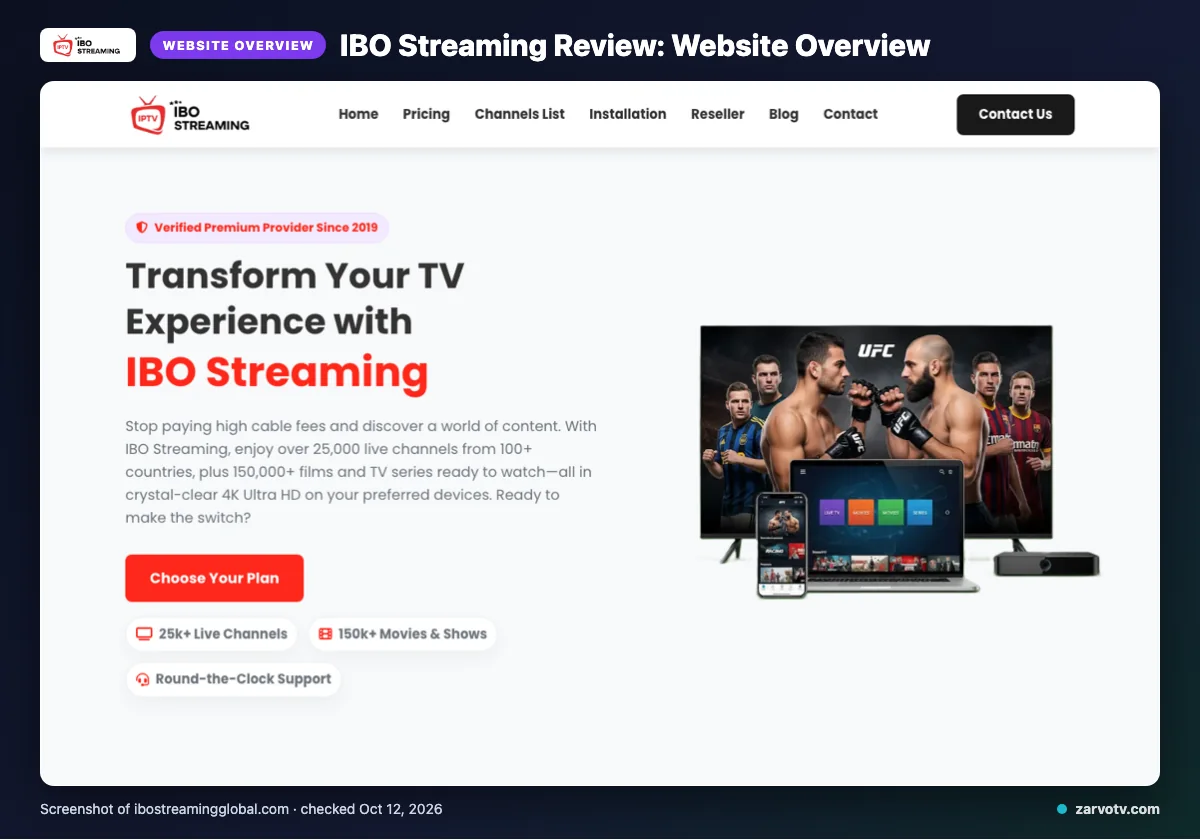
IBO Streaming describes itself as a service offering live channels, films and TV series. Its site lists several device types, so the offer may interest viewers who want these categories across screens at home.
This ibo streaming review is based on the provider’s published website, not a streaming test. We did not test playback, setup or service performance, so this section describes what the site presents rather than confirming how it works in your household.
Read the official IBO Streaming website for its current service description. If you are comparing options for a living-room TV and phones or tablets, check that the listed device information fits your setup.
Quick tip: Check the provider’s current pages directly before making a purchase.
What does IBO Streaming offer?
The site claims over 25,000 live channels, while its VOD count varies by page: 150,000+ on the homepage and 100,000+ on pricing and channel pages. Its listed quality labels range from 4K Ultra HD to standard definition.
Treat those quality labels as website claims, not a promise for every device or internet connection. Named devices include Fire TV Stick, NVIDIA Shield, Formuler, Android TV boxes, selected Samsung, LG and Sony smart TVs, MAG boxes, Apple TV, phones, tablets, Windows and macOS computers, and browsers.
Listed apps are TiviMate, IPTV Smarters Pro, Xtream UI, Perfect Player, VLC and GSE IPTV. Plans include a Live EPG TV Guide, but no catch-up feature is stated.
IBO Streaming plans and prices
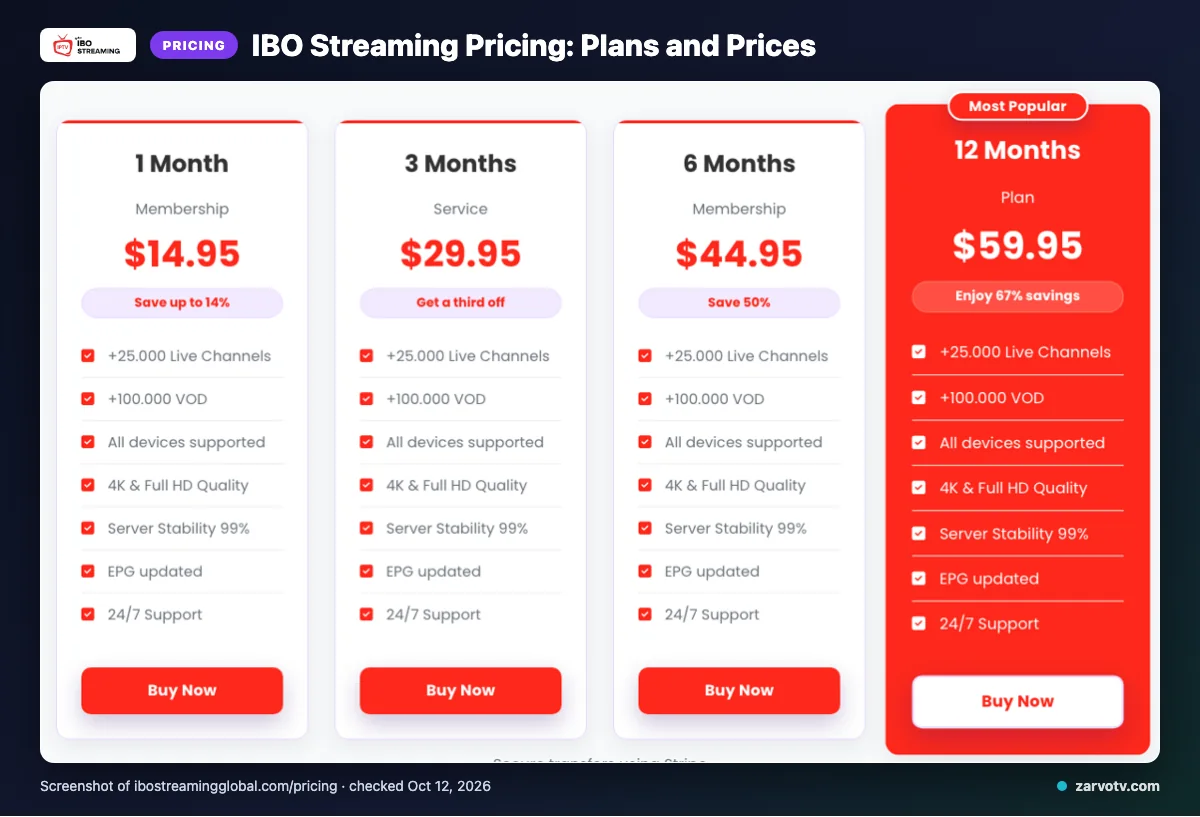
IBO Streaming lists four plans, from one month to twelve months. Each standard plan allows one device simultaneously.
| Package | Duration | Price (USD) | Simultaneous devices |
|---|---|---|---|
| Basic Package | 1 Month | $14.95 | 1 device simultaneously |
| Quarterly Subscription | 3 Months | $29.95 | 1 device simultaneously |
| Semi-Annual Package | 6 Months | $44.95 | 1 device simultaneously |
| 12-Month Package | 12 Months | $59.95 | 1 device simultaneously |
Checked October 12, 2026. Package labels vary by page, while listed durations and prices match. A second connection is stated to cost $10/year; discounted bundles are listed for 3–5 connections.
Quick tip: Compare simultaneous connections with how many people in your household are likely to watch at the same time.
Free trial, refunds and payment at IBO Streaming
Does IBO Streaming offer a free trial?
A reviewer says they initially tried a 1-month free period. This does not confirm IBO Streaming’s official trial terms.
When may you qualify for a refund?
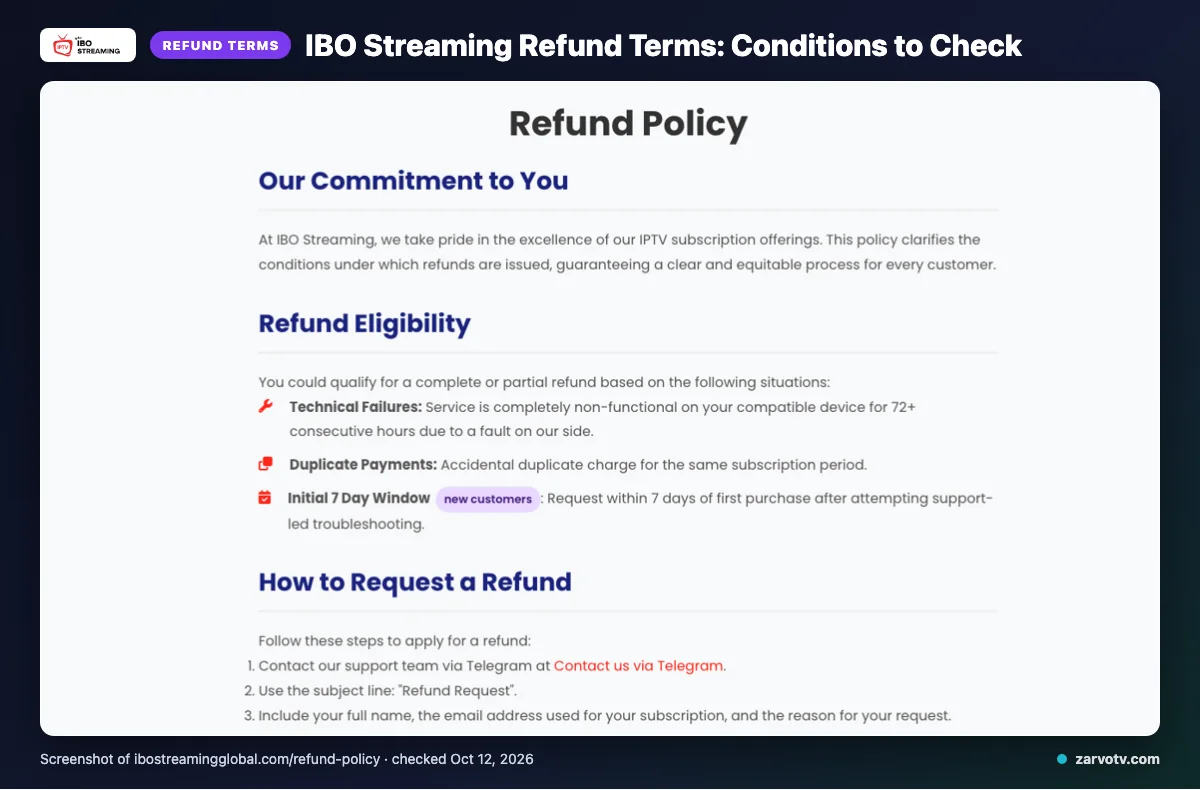
A complete or partial refund may be available for a provider-side fault that leaves service completely non-functional on a compatible device for 72+ consecutive hours, duplicate payments, or a new customer’s request within 7 days after support-led troubleshooting.
Refunds are typically unavailable for later change-of-mind requests, dissatisfaction with channels or content, internet problems, Terms of Service violations, or geo-blocking beyond the provider’s control. Renewal refunds are assessed case by case. Save the published refund terms before paying so you can check the conditions later.
Which payment methods can you use?
The site lists Visa, MasterCard, American Express, PayPal, cryptocurrency, and Stripe. It also states that you can cancel anytime.
If you’re comparing options, we invite you to try Zarvo TV’s 24-hour free trial.
IBO Streaming pros and cons
IBO Streaming’s published offer has useful breadth, but household fit depends on how you watch. These are the main trade-offs in the information reviewed.
Pros
- The offer covers live and on-demand viewing.
- It names several device and app categories.
- Refund conditions are described.
Cons
- Simultaneous-screen terms may not suit households watching on separate screens.
- Catch-up information is not stated.
- Some service claims differ between pages.
Quick tip: Judge the offer by your household’s viewing pattern, not just the size of its advertised catalog.
Is IBO Streaming legal and safe?
IBO Streaming’s legality depends on content licensing and the laws where you watch. Check applicable rules and read the provider’s terms before subscribing.
This website-based review does not verify the service’s content rights or security practices. Look for clear licensing information for the channels, films, or series you plan to watch, and ask the provider if details are unclear. Review how the terms address your account and payment information before subscribing.
How to sign up and set up IBO Streaming
Choose the screen you plan to use, then follow the provider’s signup and setup instructions for that device. The website says activation is instant after payment confirmation, but the steps can vary by app and screen.
-
Choose your main screen. Check that you can install or open the app you plan to use, and that the device has an internet connection.
-
Review the provider’s current signup instructions and select a plan. Check the order details before completing payment so you know which device the subscription will cover.
-
After payment confirmation, follow the account or setup instructions shown by the provider. If the app asks for connection details, copy them carefully rather than guessing what belongs in each field.
-
Open the selected app and complete its setup using the provider’s instructions. Keep those instructions available if you later need to configure another screen.
-
Check that the service opens and that the guide appears. If setup does not work, review the instructions and contact support through Telegram or email.
For a household with several screens, set up the main TV first, then follow the same process for a phone or bedroom screen if your subscription permits it. The standard plan’s simultaneous-device terms are covered in the plans section, so check those before expecting multiple screens to play at once.
IBO Streaming vs Zarvo TV
For a household comparing plans, trials, refunds, and screen options, the main difference is how clearly each service lists its terms. The IBO details below refer back to the earlier sections where they have already been covered.
| What to compare | IBO Streaming | Zarvo TV |
|---|---|---|
| Plans | See the plan details above; package labels vary by page, while durations and prices match. | Plans range from 1 month at $14.95 to 24 months at $99.95. Other options include 3 months at $29.95, 6 months at $39.95, and 12 months at $59.95. See Zarvo TV pricing. |
| Trial | See the trial information above. | 24-hour free trial. |
| Refund | See the refund terms above. | 7-day refund period. |
| Devices | Fire TV Stick, NVIDIA Shield, Formuler, Android TV boxes, selected smart TVs, MAG boxes, Apple TV, phones, tablets, computers, and browser. | Fire TV, Android TV and Google TV, Samsung and LG TVs, Apple devices, Android phones, Windows and Mac, and MAG boxes. |
IBO lists one device simultaneously for its standard plans, as covered above. Zarvo lists compatible device types but does not specify a simultaneous-screen allowance in the facts provided here, so check the current terms if your household watches on separate screens.
Who should choose IBO Streaming, and who should look elsewhere?
IBO Streaming may suit you if the terms reviewed above fit your household and you are comfortable with its setup. Look elsewhere if the one-screen arrangement or the site details flagged earlier leave important questions unanswered.
For a household that usually shares one main TV, the decision may be straightforward: weigh the information already reviewed against how you expect to use the service. If family members often watch on separate screens, treat simultaneous access as a key requirement, not a minor detail.
Before paying, check the provider’s current pages and confirm the package name and terms shown at checkout. Save the order confirmation, and ask support to clarify anything that could affect how your household uses the account.
Choose IBO only if you are comfortable with the purchase details and the setup suits your home. If you need room for the living-room TV, a kids’ tablet and phones to be used at once, compare connection rules carefully before deciding.
If you want to compare another option for your household, we invite you to try Zarvo TV’s 24-hour free trial.
Frequently Asked Questions
Check the Screen Limit First
IBO Streaming’s standard plans allow one device at a time, and its website gives different VOD counts on different pages. Confirm the connection options and refund terms directly before paying.
For another option, start the free 24-hour trial from Zarvo TV.