
Disclosure: Zarvo TV sells its own IPTV service, and Zarvo TV and AxosCast IPTV share common ownership. Everything below comes from AxosCast IPTV’s own website, read on October 11, 2026; no streaming tests were run.
The axoscast iptv review points to a service with broad listed device options, but each basic plan allows one connection at a time. Check the screens your household uses and confirm any extra-connection costs before subscribing.
AxosCast lists prices with a dollar sign but does not state the currency code. If you want to compare another option for every screen at home, Zarvo TV lists plans for one connection.
AxosCast IPTV at a glance
AxosCast IPTV is a subscription service presented for viewers in the US, UK, Canada, Europe and Asia. Its website also describes tailored regional options for the US, Canada, Europe and MENA.
That regional focus may interest households comparing services for viewers in these areas. It does not, by itself, show how well a shared setup will fit your household.
For a family, screen fit is a practical starting point: one person may watch on the living-room TV while another uses a phone, and a child may watch on a tablet. Check the listed device options and account terms before assuming one login suits everyone’s viewing routine.
This axoscast iptv review is based on information published on the official AxosCast IPTV website. No streaming test was run, so its descriptions should not be taken as verified playback results.
Use the site as a starting point, then compare its listed content, plan terms and setup details with what your household needs. The key question is whether the stated options fit the screens people use and how they share viewing at home.
What’s included with AxosCast IPTV
AxosCast IPTV’s website lists live channels and on-demand titles; the catalogue figures are noted above. Its homepage gives a different VOD total, so check the figures already mentioned before relying on that claim.
The site lists 4K, HD, Full HD, FHD and 4K Ultra HD formats. Named devices are Smart TVs, Android boxes, Firestick, MAG devices, iOS and PC; the listed app is IPTV Smarters.
AxosCast says its EPG is updated and helps you manage the channel list; catch-up is not listed. Anti-freeze technology, Global CDN, Predictive Content Prefetch, 99% server stability and fast channel switching are website feature claims, not tested playback results. If a family member relies on a particular screen, confirm its exact compatibility before purchase.
How much does AxosCast IPTV cost? Plans and prices
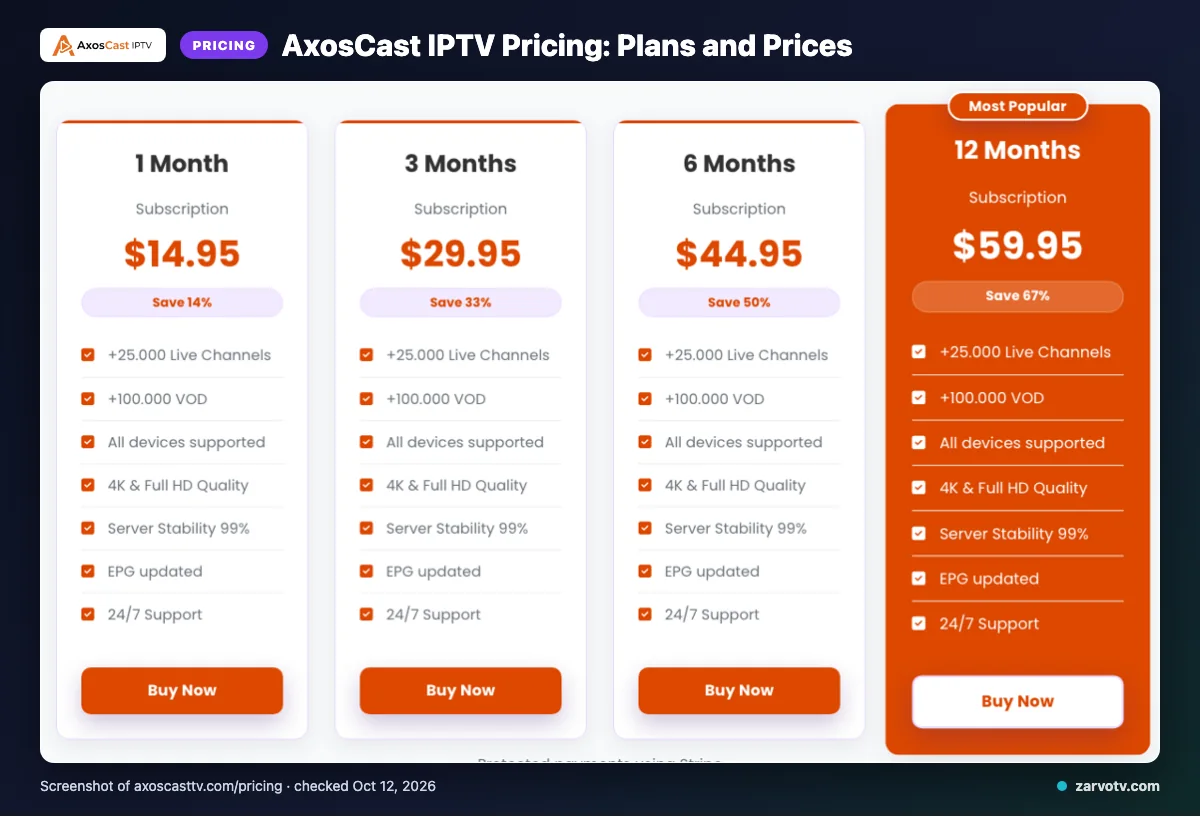
AxosCast lists four subscription terms, each allowing one connection at a time. The website was checked on 2026-10-11, and it does not explicitly state a currency code.
| Plan | Duration | Listed price | Connection allowance |
|---|---|---|---|
| 1 Month Subscription | 1 month | $14.95 | 1 connection at a time |
| 3 Months Subscription | 3 months | $29.95 | 1 connection at a time |
| 6 Months Subscription | 6 months | $44.95 | 1 connection at a time |
| 12 Months Subscription | 12 months | $59.95 | 1 connection at a time |
The site says you can add extra connections, but it does not list their price or limits.
Quick tip: Match the subscription term and connection allowance to how many household screens need access at the same time, such as a living-room TV and a kids’ tablet.
AxosCast IPTV trial, refund policy and payment options
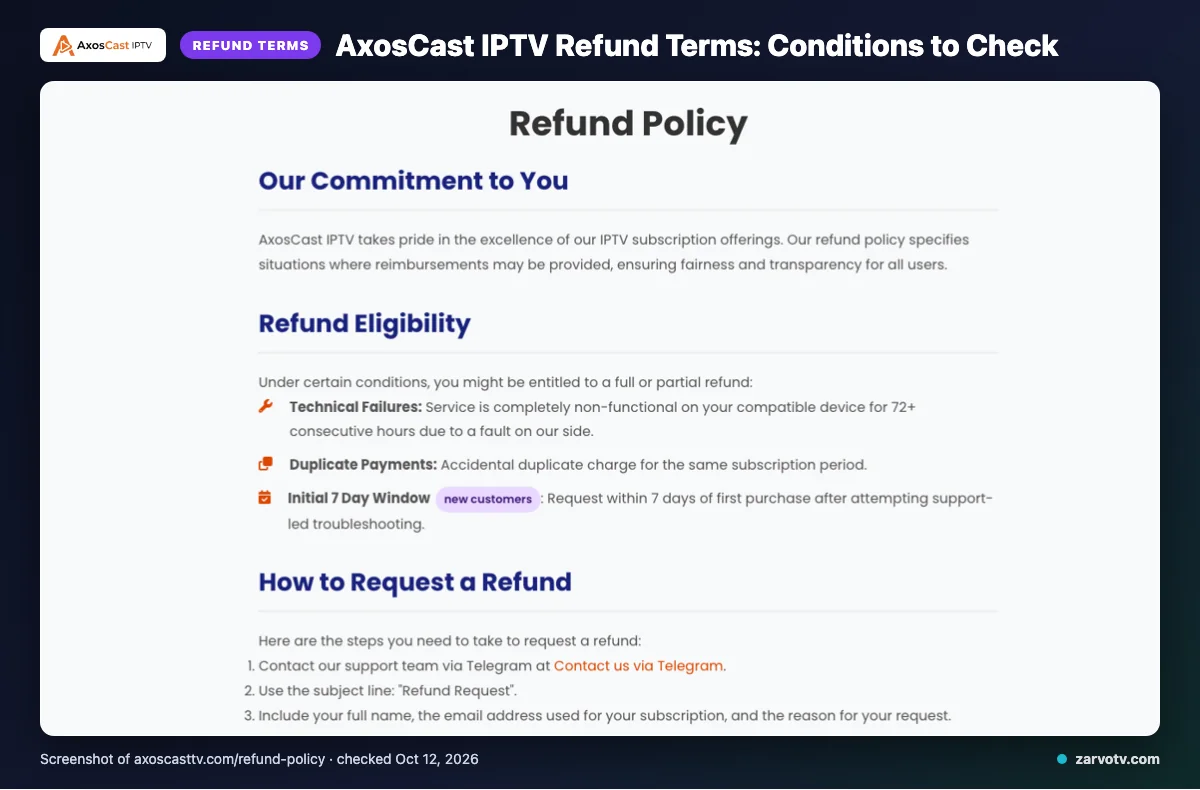
We did not find a free trial on the pages checked. The stated refund conditions include service failure for 72+ consecutive hours, duplicate payments, or a new-customer request within 7 days after support-led troubleshooting.
Refunds exclude dissatisfaction with content, slow or unstable internet, Terms of Service violations, and geo-blocking beyond the service’s control. The listed payment methods are Visa, MasterCard, American Express, PayPal and Stripe.
The refund policy contains the placeholders “{Payment Gateway Name}” and “{Payment Gateway 1} / {Payment Gateway 2}.” Save a copy of the checkout and refund terms shown when you place an order; if you want to compare another option, we invite you to explore Zarvo TV’s free trial.
The pros and cons of AxosCast IPTV
These pros and cons reflect AxosCast’s website, not user feedback or streaming tests. Its listed features may help you compare household fit, but promotional claims do not prove playback performance at home.
Pros listed on the website
- Broad stated live-channel and VOD catalogues, with figures covered above.
- Several device categories are named for different household screens.
- An EPG is listed to help manage the channel list.
- Multiple payment methods are listed.
Cons and details to check
- Catch-up is not listed.
- The currency code is unstated, and VOD totals conflict, as noted above.
Quick tip: Treat promotional features as claims to verify, not proof of how playback will perform on your TV, phone or tablet.
Is AxosCast IPTV safe and legal to use?
IPTV legality depends on content licensing and the laws where you live. The checked website pages do not list licensing details, so we can’t confirm the licensing status of its content.
This is a website-based review, and no streaming test was done. Feature descriptions alone do not establish whether a service is safe or legally authorized.
Check local rules and ask the provider about licensing for the content you plan to watch. Get clear answers before choosing a service for every screen at home.
Getting started: how to sign up for AxosCast IPTV and set it up
Start by checking whether your intended screens match the devices listed by AxosCast IPTV. Then use its checkout and setup instructions, which may vary by device.
- Check the listed options—Smart TVs, Android boxes, Firestick, MAG devices, iOS and PC—and IPTV Smarters against the screens you plan to use.
- Choose a subscription and review its duration, price and connection terms before checkout; see the plan details above.
- Select a payment method shown on the website and follow the purchase instructions presented there.
- For installation, follow AxosCast IPTV’s own guidance for your device and the listed IPTV Smarters app.
Quick tip: Set up your household’s main screen first, then check the provider’s instructions before adding another device.
Zarvo TV vs AxosCast IPTV: side by side
This table compares plans, trial and refund terms, and listed devices. Check the device row against the screens your household already uses.
| Feature | Zarvo TV | AxosCast IPTV |
|---|---|---|
| Plans | 1 month: $14.95; 3 months: $29.95; 6 months: $39.95; 12 months: $59.95; 24 months: $99.95. | 1 Month Subscription: 1 month, $14.95; 3 Months Subscription: 3 months, $29.95; 6 Months Subscription: 6 months, $44.95; 12 Months Subscription: 12 months, $59.95. Each allows 1 connection at a time. |
| Trial | 24-hour trial. | We did not find a free trial on the pages checked. |
| Refund | 7-day refund. | Conditional; see the refund terms above. |
| Devices | Firestick / Fire TV, Android TV / Google TV, Samsung and LG Smart TV, iPhone / iPad / Apple TV, Android phones, Windows / Mac, MAG box. | Smart TVs, Android boxes, Firestick, MAG devices, iOS, PC. |
Is AxosCast IPTV right for you? Who should pick it and who should look elsewhere
AxosCast IPTV may suit your household if its listed regions match your needs. This is a website-based overview, not a report of playback testing.
It lists tailored regional options for the USA, Canada, Europe and MENA.
Quick tip: Before comparing plans, check whether a regional option fits your household. This is especially useful if you want a particular regional lineup across the living-room TV, bedroom screen or phone.
Pick it if the regions and terms listed on its site suit your household. Look elsewhere if they do not. If you want another option for every screen at home, we invite you to try Zarvo TV’s free trial.
New to Zarvo TV? See the setup guide, compare plans and prices, or check the channel list.
Frequently Asked Questions
Can you add extra connections to an AxosCast IPTV plan?
Yes. AxosCast says extra connections can be added, while its listed basic plans allow one connection at a time. The pages checked do not state the price or number of extra connections, so ask support for those details before choosing a plan. This matters if you expect to watch on a bedroom TV while someone else uses a phone.
What currency are AxosCast IPTV prices shown in?
The site was checked on 2026-10-11, and its listed prices alone do not confirm whether the amounts are in US, Canadian, or another dollar currency. Confirm the currency and final charge at checkout before paying.
Which support channels does AxosCast IPTV list?
AxosCast lists email, live chat, and Telegram as support channels. Its website also describes support-led troubleshooting as part of the refund conditions for some new-customer requests. If you need help before subscribing, contact the service through a listed channel and ask about your device or connection needs.
Does AxosCast IPTV say its 99% server stability is guaranteed?
The website lists “Server Stability 99%,” but does not explicitly say that figure is guaranteed. Treat it as a stated feature, not a promise of uninterrupted viewing; no streaming test was done for this website-based review. Ask AxosCast what the figure covers before relying on it.
Does the AxosCast IPTV website give a setup delivery time?
The pages checked list “Fast setup,” but do not give a specific setup delivery time. The website information therefore does not provide a timeframe for getting started. Check with support before paying if timing matters for preparing a living-room TV, kids’ tablet, or phone.
Check the details that matter at home
Before subscribing, confirm the cost of additional connections, the currency at checkout, and whether your household’s screens fit your plan.
We invite you to start the free 24-hour trial and check Zarvo TV on your screens at home.