
Disclosure: This review is published by Zarvo TV, which sells its own IPTV service. Zarvo TV and Digitalizard share common ownership. It is based on Digitalizard’s website pages checked on October 11, 2026 and does not include streaming tests.
This digitalizard review finds a service listing live TV, VOD, and plans for one connection at a time. That limit may not suit a home where the living-room TV and kids’ tablet need separate streams.
Check the listed terms against your household’s screens before paying, and compare them with Zarvo TV if you are considering another option.
What is Digitalizard?
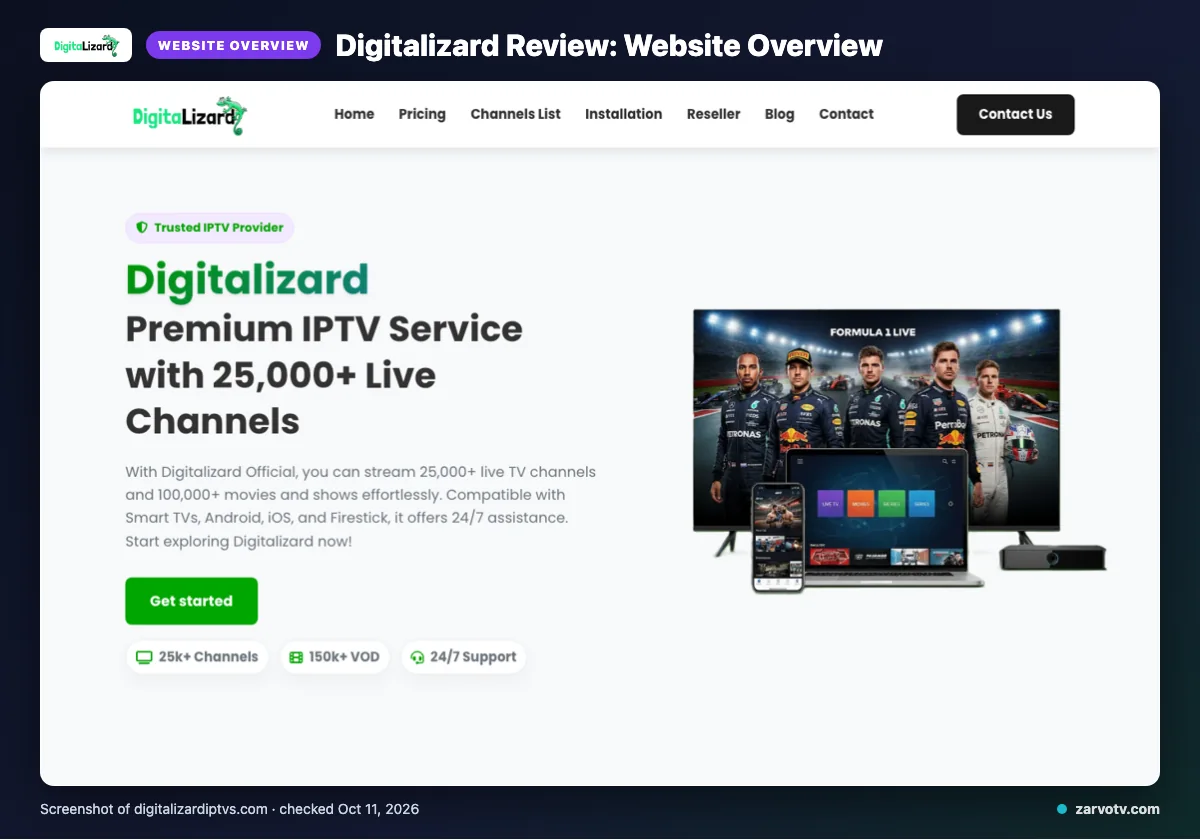
Digitalizard is an IPTV service. Its website describes live TV and video on demand (VOD); you can read its official service information.
The site names the USA, UK, Canada, Europe, Asia and MENA as its regional audience. It does not identify a specific household or family audience, so you should not assume it targets homes with several viewers.
Quick tip: Before comparing plans, list the screens your household wants to use, such as the living-room TV, kids’ tablet and your phone. Check each screen against Digitalizard’s device details on its site before choosing. That helps you check device fit before signing up.
What does Digitalizard offer?
Digitalizard lists channel and VOD totals covered earlier, plus picture formats, device categories and a named app. These are website claims, not tested playback, and a listed format does not promise every channel will use it or suit every screen.
The listed formats are 4K, HD, Full HD, FHD and 4K Ultra HD. Device categories include Smart TVs, Android, iOS, Firestick, Android boxes, MAG devices, MAG Box and PC; the named app is IPTV Smarters.
The site says an updated EPG is available; catch-up is “not listed on its website.” It also claims a global CDN, anti-freeze technology and predictive content prefetch, and says its VOD collection is refreshed daily.
Digitalizard plans and prices
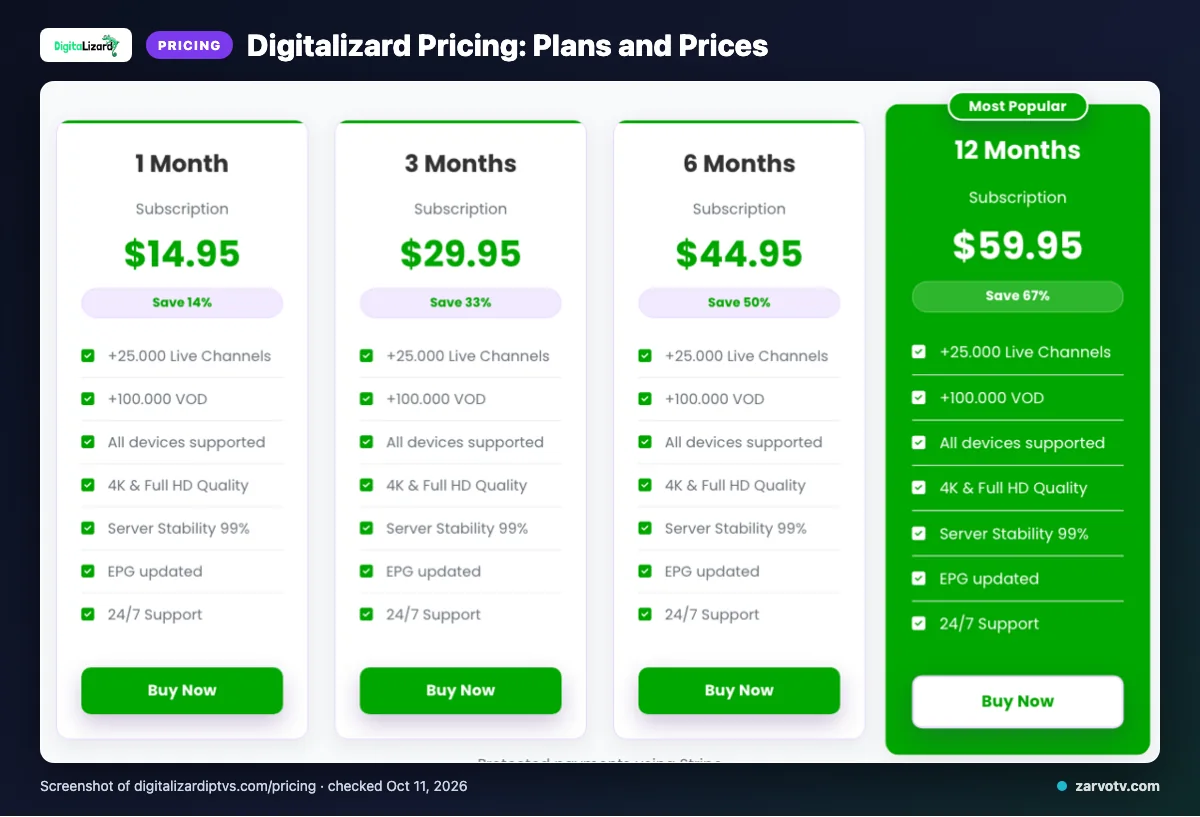
Digitalizard lists four subscription lengths, each allowing one connection at a time. The displayed prices use dollar signs, but the site does not specify the currency.
Prices checked on 2026-10-11:
| Plan | Duration | Price | Connection term |
|---|---|---|---|
| 1 Month Subscription | 1 Month | $14.95 | one connection at a time |
| 3 Months Subscription | 3 Months | $29.95 | one connection at a time |
| 6 Months Subscription | 6 Months | $44.95 | one connection at a time |
| 12 Months Subscription | 12 Months | $59.95 | one connection at a time |
Plans are configured to auto-renew at the end of each billing cycle. The site shows a 150k+ VOD badge, while its plans and other sections state 100,000+.
Quick tip: Confirm the currency at checkout before comparing displayed prices with another service.
Free trial, refunds and payment at Digitalizard
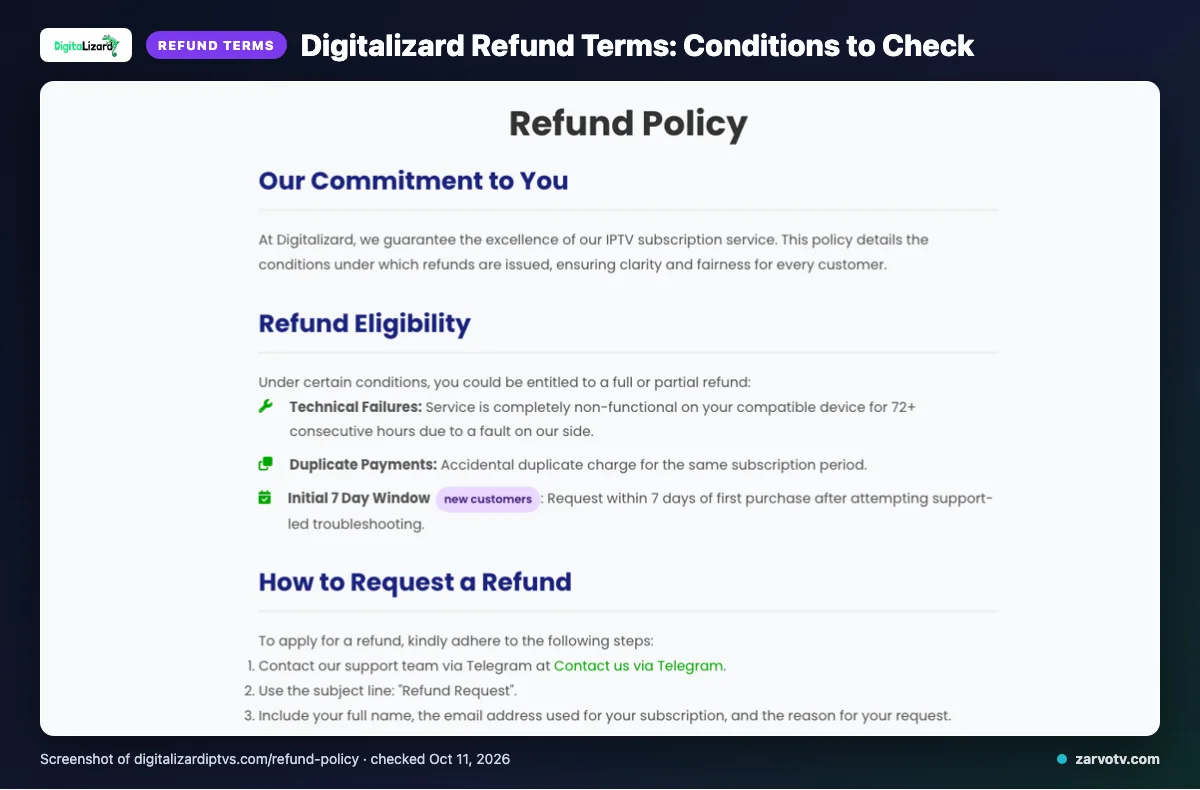
On the pages we checked, we did not find a free trial. Full or partial refunds may be available for qualifying technical failures, duplicate payments or eligible new-customer requests.
Technical failures must leave service completely non-functional on a compatible device for 72 or more consecutive hours because of a provider-side fault. New customers must request within 7 days of their first purchase and attempt support-led troubleshooting. Refunds exclude dissatisfaction with channels or content, slow or unstable internet, Terms of Service violations and geo-blocking beyond the provider’s control; renewal refunds depend on individual circumstances.
Listed payment methods are Visa, MasterCard, American Express, PayPal and Stripe. Plans are set to auto-renew each billing cycle; support routes include email, live chat and Telegram. Keep your purchase confirmation and a copy of the refund terms shown at checkout.
Digitalizard pros and cons
Digitalizard’s listed features may suit homes with several screen types, but some details need checking. Match each feature to the screens and viewing habits your household actually has.
Pros
- The previously noted channel and VOD catalogue claims may appeal if your household wants broad viewing choices.
- Smart TVs, phones, tablets, streaming sticks, boxes and PCs are among the named device categories, which may fit homes with mixed screens.
- An updated EPG may help you check programme listings before choosing something to watch.
Cons
- Catch-up is not listed on its website, a possible limitation if your household often watches programmes later.
- Only IPTV Smarters is named, so check app fit if you have a preferred setup. Other apps are not thereby ruled out.
- The site does not specify the currency, which can make price comparisons less clear.
Is Digitalizard legal and safe?
IPTV legality depends on content licensing and the laws where you live, so we can’t label Digitalizard legal or illegal. The supplied information does not establish whether it holds rights to every item of content.
This is a website-based review, and we did not conduct a streaming test. Listed claims do not verify the service’s safety or performance on your TV, tablet, or phone.
Before subscribing, look for clear licensing information and check the requirements that apply in your country or region. If details are unclear, consider asking the provider what rights cover the content you plan to watch. These checks can help you make an informed choice, but they cannot guarantee safety or legality for every use.
How to sign up and set up Digitalizard
Choose a plan, complete checkout, then follow the account instructions to set up your screens. Take it one screen at a time so you can check that the player opens and the account details work.
-
Choose the plan that suits your household, then review the checkout details before paying.
-
After checkout, check the confirmation page and any messages from the service for setup instructions. Keep those details available when you configure a player.
-
On your living-room TV, install a player that fits the device and follow its sign-in or playlist setup steps using the instructions provided with your account.
-
Repeat the setup on another household screen, such as a tablet or phone, if needed. Check that each screen opens the service before planning who will watch where.
-
If something does not work, check the entered details and the player’s setup instructions first. Then contact Digitalizard through one of its listed support channels: email, live chat or Telegram.
Quick tip: Keep account instructions somewhere you can find them, especially if another household member handles setup on a bedroom TV or tablet.
If you want to compare another option for your household screens, we invite you to try Zarvo TV’s free trial.
Digitalizard vs Zarvo TV
Digitalizard’s listed terms and Zarvo TV’s options differ on trial access, refunds, and plan choices. Compare them against the screens your household wants to use.
| What to compare | Digitalizard | Zarvo TV |
|---|---|---|
| Plans | Refer to the plan details above. | 1 month: $14.95; 3 months: $29.95; 6 months: $39.95; 12 months: $59.95; 24 months: $99.95. |
| Trial | We did not find a free trial on the pages checked. | 24-hour free trial. |
| Refund | Refer to the refund terms above; eligibility has conditions. | 7-day refund period. |
| Devices | See the device details above and check player fit for your screens. | Fire TV, Android/Google TV, Samsung and LG TVs, Apple devices, Windows, Mac, and MAG box. Listed apps include IPTV Smarters Pro, TiviMate, iPlayTV, IBO Player Pro, and Smart IPTV. |
For a living-room TV, bedroom screen, and kids’ tablet, check the device lists against the exact screens and players you use. A listed device does not by itself confirm how many screens can watch at once, so review connection terms before paying.
If you want to check Zarvo TV’s fit on your household screens, try our free trial before choosing a plan.
Who should choose Digitalizard, and who should look elsewhere?
Digitalizard may suit you if your household usually watches on one screen at a time and accepts the terms covered above. Look elsewhere if you need several screens playing at once under one subscription, or confirm connection options before paying.
Who may find it a reasonable fit?
It may work for a household where people take turns watching, rather than using the living-room TV, bedroom TV and tablet simultaneously. Your choice should also depend on whether the service’s stated terms match what you need.
Before deciding, revisit the renewal and refund details already covered. Make sure you are comfortable with those conditions, not just the features that caught your attention.
Who should look elsewhere?
Consider another option if everyone expects to watch different content at the same time. That could mean a parent watching on the TV while someone else uses a tablet or phone.
Also pause if you need clearer answers before subscribing. Ask the provider about any detail that could affect your household, and keep the reply for reference.
What is the simplest way to decide?
List the screens you expect to use together, then compare that need with the connection terms already outlined. Choose Digitalizard only if the fit and conditions work for your home.
New to Zarvo TV? See the setup guide, compare plans and prices, or check the channel list.
Frequently Asked Questions
Check the Terms Before You Choose
Its site shows prices with dollar signs but does not specify the currency, and refunds have conditions.
Review the connection limit and refund terms against your household’s needs before checkout.
To compare Zarvo TV, start the free 24-hour trial.